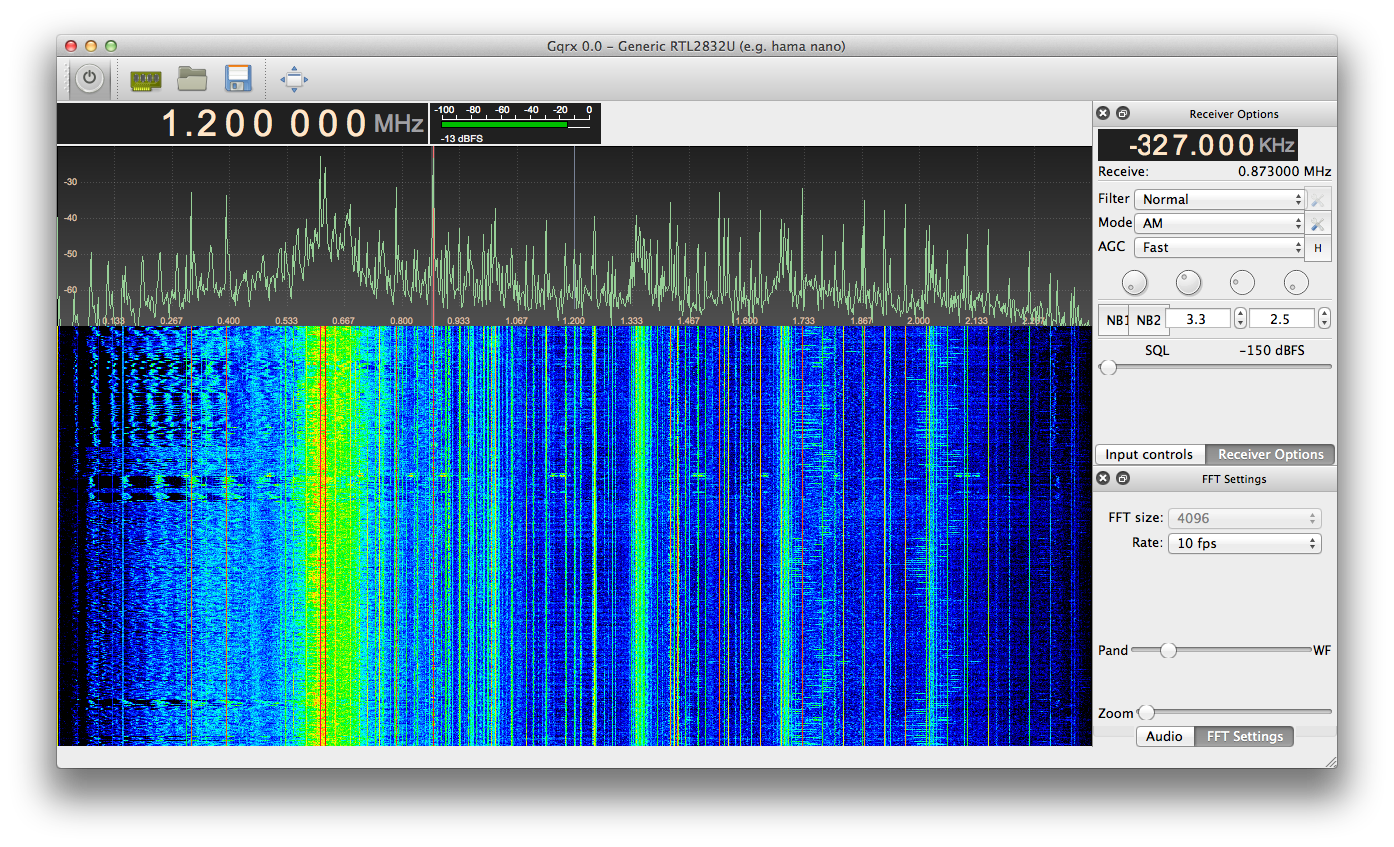
OSX port of the awesome gqrx SDR software [Update 02/03/2013]

A while ago I already managed to compile gqrx on OSX, but then Alexandru Csete decided to move on to a new audio backend called pulseaudio. Sadly there is no proper pulseaudio port for OSX. Thus I bring you my branch of gqrx 2.1 which runs quite well on OSX.

It contains all the rtl-sdr, gr-osmosdr, GNU Radio, libUSB, boost and Qt dependencies so it should work out of the box. Feel free to contact me in case you encounter problems. I built it on OSX Lion (10.7), and people on Reddit reported it running well on OSX Mountain Lion (10.8). I assume it also runs on Snow Leopard (10.6), though I don’t know for sure. Sadly Leopard (10.5) isn’t supported due to Apple breaking binary compatibility on 64bit binaries for some reason.

Download the ready to use DMG/APP here:
gqrx_7.dmg – (02/03/2013) Up to date with GIT. I’ve added a deadlock prevention feature in case your settings keep gqrx from starting up properly. After a crash/forced-close it asks you whether you want to reset all your settings to default. This should help you guys with invalid rtl_tcp settings and the like. I have also fixed rtl_fm to now properly work on OSX (It used to only output noise), as well as multimonNG which now supports umlauts for POCSAG decoding. So check out the bundled command-line utilities! :) (e.g. /Applications/Gqrx.app/Contents/MacOS/rtl_test -t)
Continue reading ‘OSX port of the awesome gqrx SDR software [Update 02/03/2013]’ »

RTL-SDR transformer mod

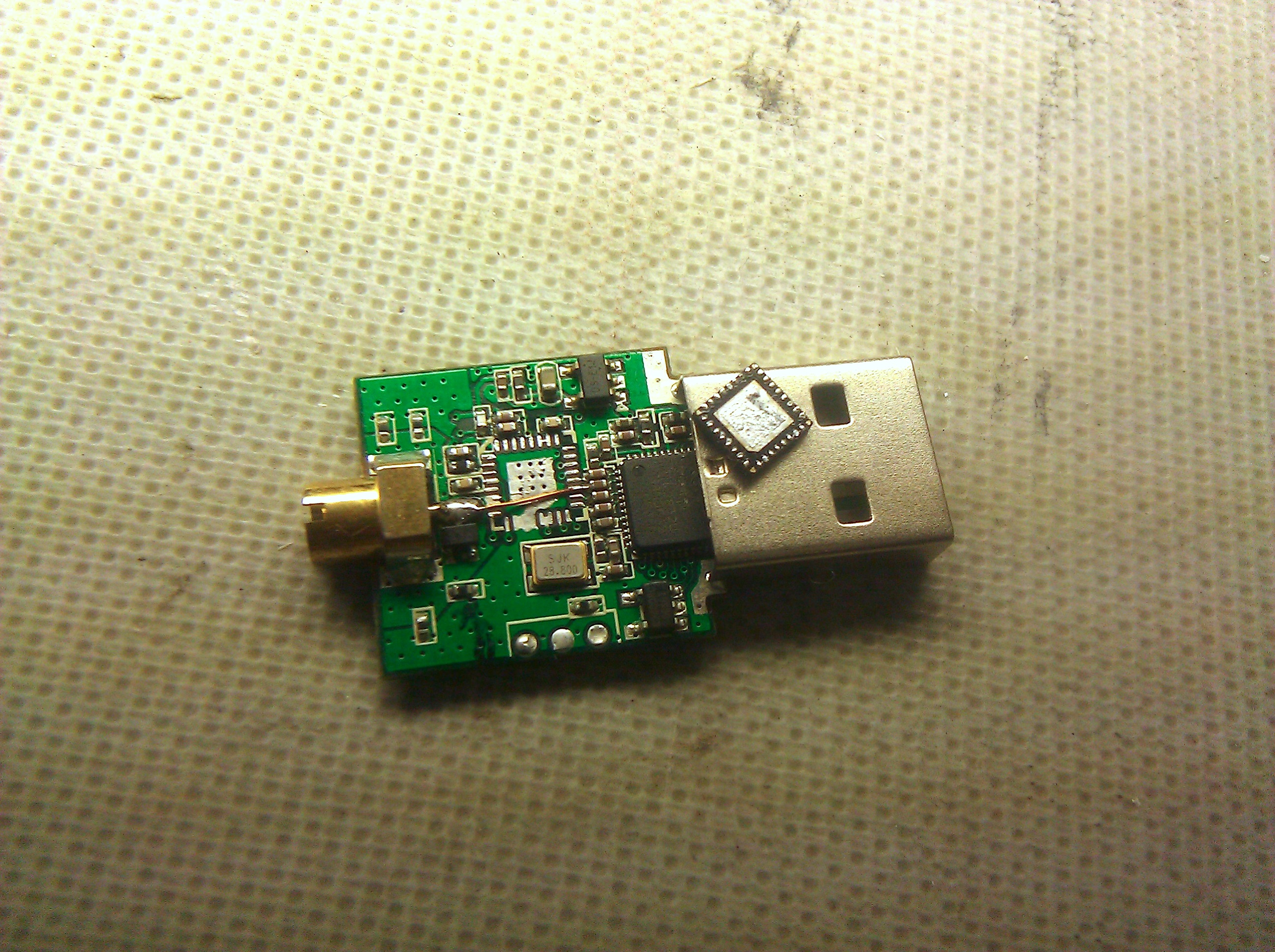
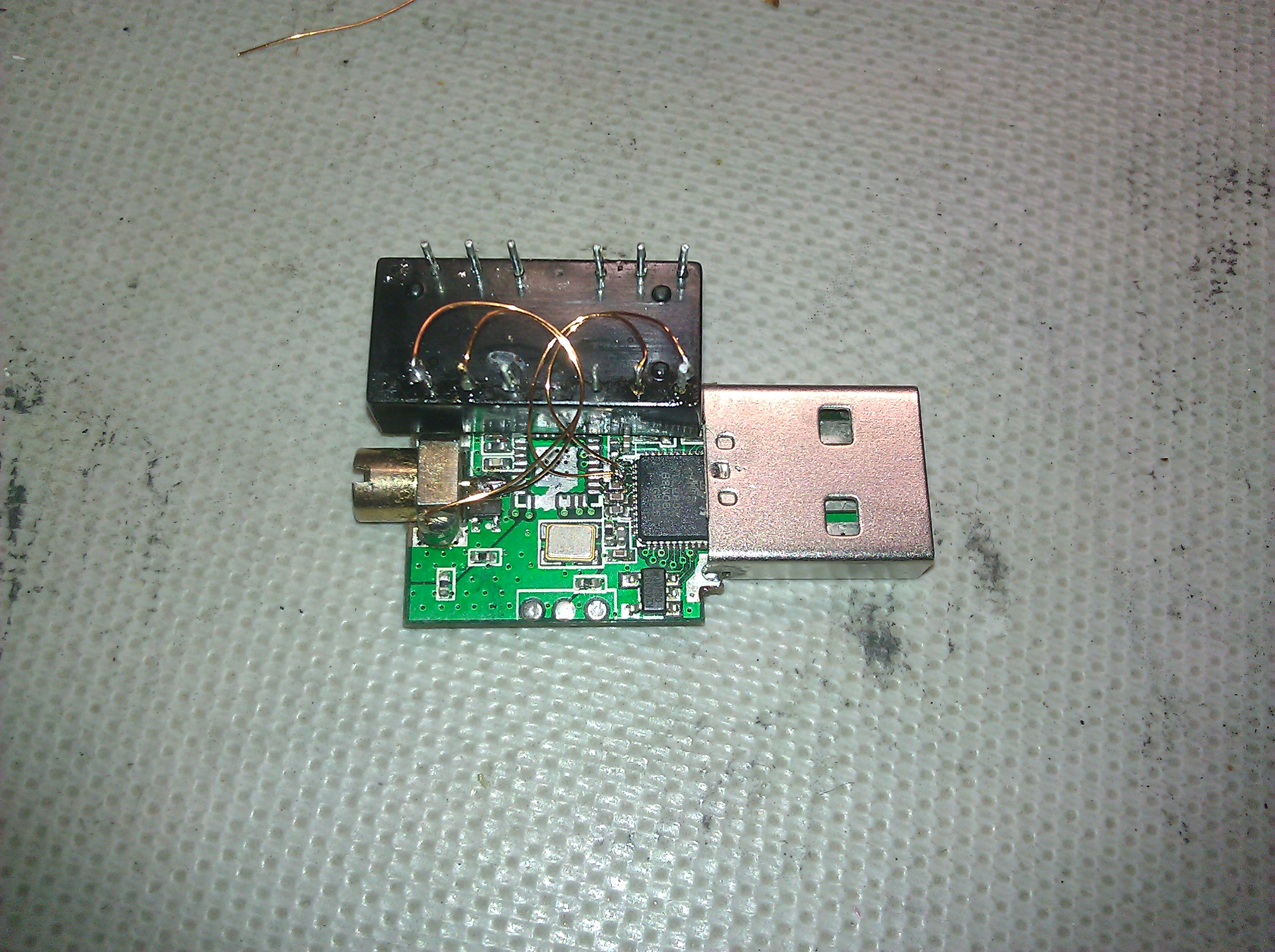
Quite a while ago I tried the HF Mod (aka Direct Sampling Mod) on one of my dongles. The simplest way of doing it is by connecting one of the RTL2832U’s ADC (pin 1 or 2) inputs to an antenna which is exactly how I started. Shortly after that mikikg told me about using a transformer in order to generate a differential signal for the ADCs differential input, as well as boosting the signal and matching impedance. As a quick and dirty solution I desoldered a H16105DF 10/100Mbps Ethernet decoupling transformer from an old ADSL modem and used it. It actually matches the frequencies we care about quite well and in addition serves as a low pass filter. At the moment it is used in a 1:1 configuration, though 1:2 will probably perform better, thus I plan to try that as well. Using it together with an antenna made from a few meters of litz I receive many AM radio stations as well as lots of other signals.

Update:
Since someone over at reddit claimed that mikikg originally came up with using Ethernet transformers for the mod, implying I wouldn’t credit him properly, I feel like clarifying. On 10/3/12 I sent him a mail explaining that I had tried a variation of the HF-Mod using an Ethernet transformer and that the results were promising, I also attached a picture to that mail. Seemingly we then both blogged about it quite a while later, yet he did so before I did.

Update #2:
I have tried using the transformer in a 1:2 configuration and the signal actually got worse. That makes me wonder about the RTL2832U’s input impedance.

Power supply failures can be pretty annoying to find

Recently one of the four drives in my HTPC kept dropping out, first it happened once every few days, then after several hours. The weird thing was that it always came back after losing the SATA link and allowed me to mount it again. I first thought it was a problem of the SATA controller or cables so I switched the drives around, yet the same drive was still affected. I then assumed it was related to the drive which got me sidetracked for a while, till I routinely decided to reset the BIOS. Doing so I randomly had a look at the supply voltages, the 12V rail had dropped to around 10.2V.
Gladly I had a spare ATX PSU which I then switched in resolving all the problems. The PSU that failed was a one hung low 75W high efficiency one that came with a miniITX case I bought a while ago. It consists of a AC/DC power brick supplying 12V and a DC/DC switch mode board generating the whole variety of ATX voltages. Some of the DC/DC boards electrolytic capacitors were bulgy and I couldn’t even find a datasheet for their brand so I decided to replace them all with fresh low ESR ones. Needless to say that solved the problem and it now works fine (11.83V) again.
It really was an annoying experience and the symptoms were highly misleading. After all the drive was fine, and it was just the manifestation of a completely different problem. From now on I will routinely check lm-sensors for voltages as well.

Continue reading ‘Power supply failures can be pretty annoying to find’ »

The power of TNT is at your disposal

TNT stands for Thumb2 Newlib Toolchain, a GCC/Newlib based toolchain project I started quite a while ago. Trying various other toolchains like CodeSourcery, summon-arm-toolchain and YAGARTO, I realized none of them really seemed to have the smallest ARM Cortex-M microcontrollers in mind; They were wasteful with RAM as well as flash memory. TNT has been optimized for small unhosted (bare-metal) microcontroller targets and thus size optimizations have been the primary goal. Especially the C-library Newlib has been configured for the least possible size which makes using it (e.g. printf()) much more affordable. I have seen size reductions of over 30% compared to other GCC based toolchains when compiling the TNT_Example project.

The following architectures are supported:
armv6s-m (cortex-m0/cortex-m1) armv7-m (cortex-m3) armv7e-m (cortex-m4/cortex-m4f including FPU and DSP instruction support)

The TNT_Example project is targeted at beginners using STM32 microcontrollers, it plays well with TNT and other GCC based toolchains. It has an example on how to implement the Newlib stubs to get syscalls like malloc() and printf() working. For the STM32F4 discovery board you can just compile it and get the lights blinking. For other targets you’ll have to slightly adjust the makefile. https://github.com/EliasOenal/TNT_Example

TNT precompiled downloads:
Linux x64
OSX x64

Source:
https://github.com/EliasOenal/TNT

Continue reading ‘The power of TNT is at your disposal’ »

Fixing a weird problem where macdeployqt drops icons from app bundle

Qt has a great tool for building self contained application bundles on OSX, it’s called “macdeployqt”. Though I recently had a really weird bug while using it. When I ran the application normally everything was fine, but once I used the macdeployqt all the icons were missing. After a while investigating this I realized not all types of icons were affected, SVGs wouldn’t show, yet JPGs would. Long story short, you have to explicitly declare the use of the SVG module (or any other module you use) inside the project file so it ends up in the final bundle.

tl;dr:
QT += svg

multimonNG

Due to my recent acquisition of an RTL-SDR compatible radio module (Some would call it DVB-T stick) I started playing with radio transmissions. Doing so I found POCSAG transmissions which I tried to decode using multimon. Sadly multimon was very broken, after I finally managed to compile it on OS X I realized it had 64bit bugs preventing the decoding on my system. So I forked it and patched a lot. I rewrote large parts of the POCSAG decoder after reading the patent text as well as implemented the BCH forward error correction. Besides improving POCSAG my main focus was portability, it now even compiles on windows :)

MultimonNG a fork of multimon. It decodes the following digital transmission modes:
POCSAG512 POCSAG1200 POCSAG2400 EAS UFSK1200 CLIPFSK AFSK1200 AFSK2400 AFSK2400_2 AFSK2400_3 HAPN4800 FSK9600 DTMF ZVEI

The following changes have been made so far:
-Fixes for x64
-Basic functionality on Mac OS X ‘Lion’ (Soundcard/OSS input is unsupported)
-’DUMMY_AUDIO’ “backend” (Gets rid of the OSS dependency, breaks audio in doing so)
-’ONLY_RAW’ disables the format conversion while getting rid of posix dependencies
-Option ‘NO_X11′ to disable the X11 dependency since Apple will drop Xorg soon
-Override mode for POCSAG decoding (e.g. force text decoding)
-Brute-Force BCH implementation for POCSAG forward error correction
-Verbose mode is now listed in ‘-h’
-Merged Debian patches for EAS (Emergency Alert System) decoding (untested)
-Portability is a major goal
-Compiles on Windows (MinGW or Cygwin) without format conversion
-PulseAudio support, contributed by inf_l00p_
-Windows native audio and a VisualStudio/MSVC project file, contributed by bzzt_ploink

In addition to the deprecated legacy Makefile there is also a file for qmake which is the preferred way of building MultimonNG. It’s recommended to use qmake to generate the Makefile. (‘qmake multimonNG.pro && make’)
So far multimonNG has been successfully built on OS X, Debian, Ubuntu and Windows. (On Windows using the Qt-MinGW build environment, as well as Cygwin and VisualStudio/MSVC)

Files can be easily converted into multimonNGs native raw format using ‘sox’.
e.g. “sox -t wav pocsag_short.wav -esigned-integer -b16 -r 22050 -t raw pocsag_short.raw”
GNURadio can also generate the format using the file sink in input mode ‘short’.

Source: https://github.com/EliasOenal/multimonNG/
License: GPLv2

Windows version (Update 02/02/13 – Properly convert umlauts.): multimonNG_win32

Some testfile converted to the native multimon format: poc1200
(Source: http://www.kb9ukd.com/digital/)
To decode it try “multimonNG.exe -a POCSAG1200 -t raw poc1200.raw”.

PS:
Superkuh wrote a bit about using multimonNG with GNURadio allowing for realtime decoding. http://superkuh.com/rtlsdr.html

PPS:
Apparently you can combine multimonNG with rtl_fm to live decode POCSAG. It even seems to be lightweight enough to work on a Raspberry Pi. Thanks to Sonny_Jim from ##rtlsdr on freenode for trying!

<Sonny_Jim> Ok, so this works:
<Sonny_Jim> rtl_fm -f 153.353e6 -g 100 -s 22050 -l 310 – |multimon -t raw -a POCSAG1200 -f alpha /dev/stdin

Overclocking my HTC Vision aka Desire Z aka G2

I’ve recently added some modifications to the Cyanogenmod kernel. They include overclocking up to 2ghz as well as lower idle voltages (undervolting) and a higher default maximum frequency. The maximum frequency after bootup is now 1516800hz. It can be changed up to 2016000hz. Frequencies higher than 1612800hz are unstable when using the ondemand governor on my phone, they seem to be stable when used with the performance governor or even the conservative one, so I think it might be related to the fast frequency switching. At 2ghz the phone gets really hot in a matter of minutes so be careful, you can probably damage it using this kernel. Thus I take no responsibility for any damages resulting from using this kernel!

My frequency(in hz)/voltage(in mV)-table is the following:
245760 750
368640 800
768000 900
806400 925
1113600 1000
1209600 1050
1305600 1100
1401600 1150
1497600 1225
1516800 1225
1612800 1300
1708800 1450
1804800 1500
1920000 1500
2016000 1500

Download: zImage bcm4329.ko

PS:
I just was able to lower the voltages a bit, here is the new kernel: zImage_v2
245760 750
368640 800
768000 900
806400 925
1113600 1000
1209600 1050
1305600 1100
1401600 1150
1516800 1200
1612800 1250
1708800 1300
1804800 1400
1920000 1450
2016000 1500

PPS:
I made a third version containing a crude hack to fix the problem with the governors. Now my phone runs at min 245mhz and max 1920mhz using the ondemand governor.
Download: zImage_v3
Source: acpuclock-7×30 (The only file I changed) https://github.com/CyanogenMod/htc-kernel-msm7x30

PPPS:
The easiest way to flash it is using fastboot and adb from the android sdk. I guess I could also build a flashable zip, but I don’t feel like figuring how that works. If someone makes one, feel free to send me a copy, I’ll attach it here.
Flashing the kernel:

fastboot flash zimage zImage

Flashing the new WiFi module:

adb remount
adb push bcm4329.ko /system/lib/modules

After using my kernel for quite a while it seems to be pretty stable on my phone. Running at 2GHz I sometimes get random freezes, but 1.92GHz seems stable for daily use. I also tried playing 3d games on 1.92GHz for about half an hour and even though the phone got noticeably hot everything went peachy. :)

A driver independent and really ugly way to set the display brightness

I lately had some problems changing my laptops (A Samsung Q45) brightness since the major distributions went on and started using KMS instead of the prior Xorg driver, even though most Samsung laptops aren’t properly supported. Searching around the net I found some hints about using setpci – Writing directly into the hardware.

dekar@vasectomy:~$ sudo dmidecode -s system-manufacturer
SAMSUNG ELECTRONICS CO., LTD.
dekar@vasectomy:~$ sudo dmidecode -s system-product-name
SQ45S70S
dekar@vasectomy:~$ lspci | grep VGA
00:02.0 VGA compatible controller: Intel Corporation Mobile GM965/GL960 Integrated Graphics Controller (rev 03)
dekar@vasectomy:~$ sudo setpci -s 00:02.0 F4.B=FF

Values between 0×00 and 0xFF should work, though my display turns off once I lower them too far and refuses to start working unless I reboot the whole thing. 0×40 to 0xFF should be safe.

Update:
The following samsung-backlight fork worked for me in fully integrating the backlight control again. Works fine now using the hotkeys :)

https://github.com/xonatius/samsung-backlight

You probably need to install the kernel sources, at least the headers. Besides this installing should be totally painless and after doing so you can load it using ‘modprobe samsung-backlight’.

My Optoma HD700X projector running at 120hz – So I can probably do 3D?

I didn’t find any information about this (just people whining about not getting a firmware update) so I feel like posting it so others may find it using google. My HD700X seems to be able to do 120hz. I just did a quick test using my laptop (vga) since my media pc (hdmi) is broken right now, but it seems to work. I am running Debian and all I did was set the resolution, it just worked. The online specs I read state it could only do 100hz, but it even shows me it is actually running at 120hz. So if anyone has one of those projectors, as well as 3D equipment, I would highly appreciate any feedback on how well it works since I am thinking about getting shutter glasses as well. ;)

2010-08-23-22.54.53
Update:
Watching 24p video at 24hz is fluent (besides the 24p lagginess), same for 48hz. But from that point on (72hz, 96hz and 120hz) it starts juttering. I am not sure whether that’s vdpau/nvidia or the projector. I also realized my HD700X reports as HD65 according to the EDID data. Pretty weird – I guess the easiest way to find out whether it actually supports 120hz is getting 3d shutter equipment.

Update #2:
Optoma released an official firmware update unlocking 120hz operation including DLP-Link for the HD65, HD700x and GT7000 projectors.

Download it here